
Affiliate Disclosure: This article contains affiliate links. If you purchase through these links, I may earn a commission at no additional cost to you. I only recommend products I personally use and trust.
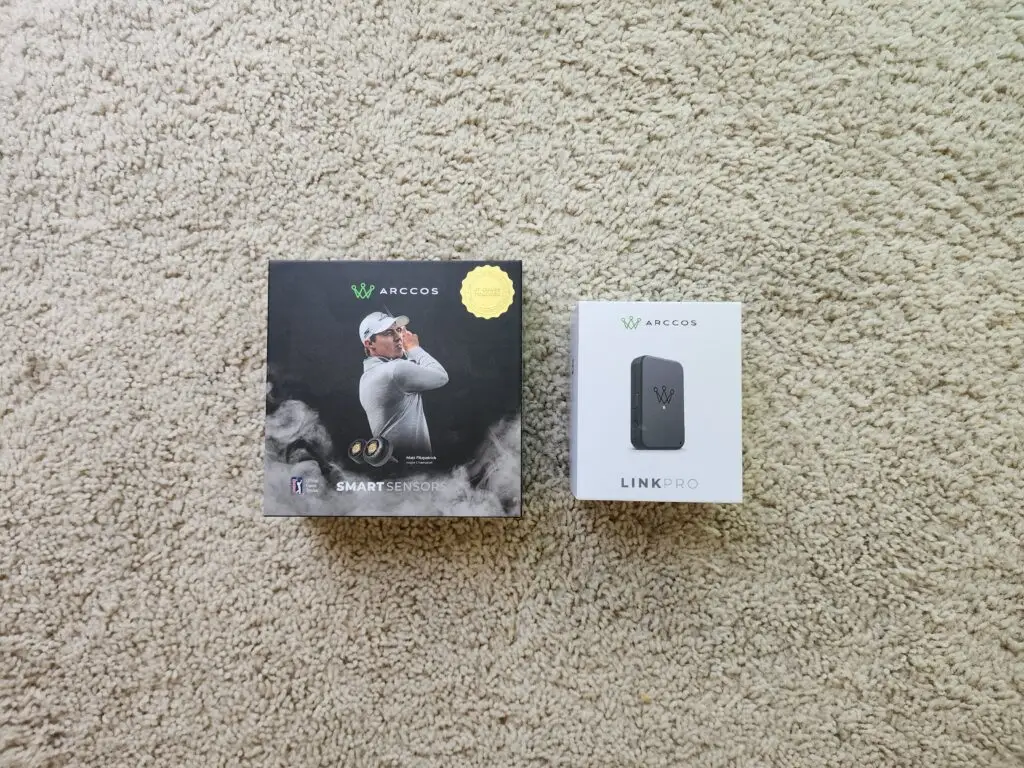
Arccos Smart Sensors are the small grip-mounted devices that automatically track every shot you hit on the golf course and feed the data into an app for strokes-gained analysis. I have been running Arccos Smart Sensors Gen 4 in every club in my bag across six SCGA tournaments and dozens of practice rounds in 2026. The data Arccos has surfaced about my game is the most useful objective feedback I have ever had — and some of it has been genuinely surprising.
This is a data-driven review of Arccos Smart Sensors from the perspective of a 56-year-old 3-handicap who competes seriously. Most Arccos reviews online are surface-level — “here are the features, here is the price, buy it or do not.” That is not useful. What is useful is showing you the actual numbers the sensors revealed about a real golfer’s game, what those numbers mean, and whether the system is worth the investment based on the data alone.
What Arccos Smart Sensors Do
Arccos Smart Sensors are small lightweight sensors that screw into the butt end of every club grip. Each sensor is uniquely paired to a specific club in the Arccos app. When you hit a shot, the sensor detects the swing, records the location via your phone’s GPS, identifies which club hit the shot, and logs it to the app — all automatically, with zero input from you during the round.
By the end of an 18-hole round, the system has logged every shot, every distance, every dispersion pattern, and run the data through a strokes-gained analysis engine that compares your performance to scratch golfers. The output is a complete round breakdown with strokes gained or lost in each of five categories: driving, approach, around the green, short game, and putting.
The promise of Arccos Smart Sensors is simple: track everything automatically, get tour-level analytics, find your real scoring leaks. The question this review answers is whether that promise holds up under tournament-level usage — and what the data actually reveals when you put it in the hands of a competitive amateur for a full season.
The Data Arccos Smart Sensors Revealed About My Game
Before Arccos Smart Sensors, I assumed my biggest scoring leak was driving — too many push-fades into trouble. After 6 tournaments and 30+ rounds of data, the sensors revealed something completely different. My driving was actually one of my better categories. My putting was the leak that had been quietly bleeding strokes for years.
Here is the strokes gained breakdown Arccos surfaced for my 2026 season to date, versus a scratch golfer baseline:
- Driving: -0.9 strokes per round (slightly worse than scratch, driven by occasional penalty strokes)
- Approach: -0.8 strokes per round (improved from -2.0 earlier in season)
- Around the Green: -0.4 strokes per round (best category, near-scratch)
- Short Game: -0.6 strokes per round (chipping and pitching)
- Putting: -1.3 strokes per round (the leak I did not know I had)
- Total: -3.6 strokes per round vs scratch (consistent with my 3 handicap)
Without this data, I never would have known putting was costing me 1.3 strokes per round. I would have kept practicing the driver — the thing I assumed was the problem — instead of fixing the actual leak. The data shifted my entire practice priority, and that single shift is worth more than the cost of the sensors over a single season.
Arccos Smart Sensors and the Putting Problem
The most valuable thing Arccos Smart Sensors did was force me to confront my putting honestly. The strokes gained data showed exactly where the problem lived: three-putts. My three-putt percentage was running at 2.3 per round — significantly above the 1.3 per round that scratch golfers average. Every additional three-putt is a stroke given back. That math alone explained the -1.3 strokes gained deficit.
The Arccos data also revealed that my putting problem was not a line problem — it was a speed problem. The breakdown showed that my approach putts from outside 25 feet were leaving me consistently outside the 3-foot make-zone, which created the three-foot comeback putts that I was missing at higher rates than I realized. That insight became the foundation for the entire How to Stop 3-Putting article and the practice changes I made after the El Camino round.
This is what the sensors do that no other tool can match. Subjective feel will tell you that you hit some bad putts. Objective data tells you which kind of bad putts, how often, and what it is costing you per round. That distinction is the difference between random practice and targeted improvement.
Arccos Smart Sensors and Club Distance Reality
The second category where the sensors changed my thinking was club distances. Most amateur golfers — including me, before Arccos — think their average distance is closer to their best distance than their actual average. The data corrected that misconception fast.
My 7-iron carry distance: I thought it was 165 yards. The data revealed the actual average carry was 158 yards. That seven-yard gap is the difference between landing on the green and short-siding myself in the front bunker. The data forced me to club up on approach shots, which immediately raised my greens-in-regulation percentage.
The full club distance breakdown that Arccos Smart Sensors surfaced is now the foundation of my course management. I built an entire article around the data — Proven Golf Club Distance Chart at 106mph: Real Arccos Data — that walks through every club, every average carry distance, and the dispersion patterns the sensors revealed. None of that data existed for me before Arccos. Now it drives every approach shot decision I make.
The club distance data also validated the work I have been doing with the Stack System overspeed training. The 17 mph driver swing speed gain I have made over 15 months has translated to real on-course distance — exactly what the Arccos data confirmed across hundreds of tracked shots. Without Arccos Smart Sensors, the Stack System gains would have been theoretical. With Arccos, they are measurable and repeatable.
Arccos Smart Sensors: The Setup and Daily Use
The premise of Arccos Smart Sensors is automatic tracking. The reality is mostly automatic, with a few honest caveats worth knowing before you buy.
Setup is straightforward. Each sensor screws into the butt cap of a grip — you may need to remove an existing weight or end cap depending on your clubs. The Arccos app walks you through pairing each sensor to the correct club. Initial setup takes about 20 minutes for a full 14-club bag.
Battery life is excellent. The Gen 4 batteries last about 5 years per sensor. There is no charging — when a battery dies, you replace the sensor. At 5 years, that is a non-issue for daily use.
Phone GPS is the engine — or Link Pro if you upgrade. The sensors detect swings, but your phone’s GPS captures shot location. That means the base system requires your phone in your pocket during every round, with GPS on, and Bluetooth on. Battery drain on your phone is real — I lose about 30 percent of my iPhone battery during an 18-hole round with Arccos active.
The upgrade path is the Arccos Link Pro — a small Bluetooth-enabled device that clips to your belt and takes over the phone’s role as the tracking hub. I wear the Link Pro on my belt during every round. It measurably improves shot detection accuracy, especially on chips and partial wedges that phone-only setups sometimes miss, and it dramatically reduces phone battery drain. If you plan to play more than 20 rounds per year with Arccos, the Link Pro is worth it.
Auto-detection is about 90 to 95 percent accurate. Arccos catches most shots. It occasionally misses chips around the green, sometimes records two shots when you take a practice swing right before a real shot, and rarely records a shot with the wrong club. The app lets you correct any misclassified shots after the round in about 60 seconds.
The Arccos Air subscription unlocks the analytics. The sensors themselves are a one-time purchase. The strokes-gained analysis, AI Caddie, and full data dashboards require an Arccos Air subscription (currently around $100/year). Sensors without the subscription give you basic shot tracking. The subscription is what makes the system genuinely useful.
Arccos Smart Sensors Pricing and Subscription Value
A complete Arccos Smart Sensors review has to address the real cost of ownership. The pricing model splits into two parts — a one-time sensor purchase and an ongoing subscription — and understanding both is essential for evaluating whether the system makes sense for your game.
Sensor pack purchase: A full 14-sensor set runs around $200 retail. That covers every club in the bag plus a spare. The sensors themselves are a one-time cost — no chargers, no batteries to replace for roughly 5 years per sensor.
Arccos Air subscription: Currently $99.99 per year for the analytics dashboard, strokes-gained breakdown, AI Caddie, and unlimited round logging. Without the subscription, the sensors still capture basic shot data but the strokes-gained analysis that makes the system genuinely useful is locked behind the subscription paywall.
Year 1 total cost: Approximately $300 — sensors plus first-year subscription. The Arccos Smart Sensors Gen 4 bundle with Link Pro and first-year membership runs a bit higher but includes the belt-worn Link Pro device, which I recommend for anyone playing more than 20 rounds per year.
Year 2 and beyond: $100 per year for the subscription. Sensors continue to work for years on their original batteries.
For context, $300 in Year 1 is less than most golfers spend on a single new driver. It is less than half the cost of a quality launch monitor. And the data Arccos Smart Sensors generate compounds across every round you play — every tournament, every practice round, every casual round becomes a data point that informs the next decision.
The subscription is the part that gives most prospective buyers pause. Annual subscriptions feel like ongoing burden. But the value Arccos delivers requires the analytics engine, and that engine is what justifies the subscription. After two seasons of data, the cumulative insights are worth far more than the cumulative cost. If you are a golfer who plays 30+ rounds per year and cares about improvement, the math works decisively in favor of Arccos Smart Sensors.
Arccos Smart Sensors: The Honest Limitations
No product is perfect, and a useful review covers the limitations. Here is what the Arccos Smart Sensors system does not do well.
Putting tracking is the weakest area. Arccos records putts but cannot measure stroke quality, face angle at impact, or other putting-specific metrics that dedicated putting trackers offer. For putting analytics, the system is useful for putts-per-round and three-putt percentage but limited beyond that.
Penalty strokes require manual entry. If you hit a ball out of bounds and re-tee, Arccos cannot auto-detect the penalty. You have to add it in the app, usually after the round.
Phone dependency is real. If your phone battery dies mid-round, the data stops. If GPS reception is bad, shot locations get inaccurate. If you forget to start a round in the app, no data gets recorded.
Walking versus riding affects accuracy. Riding in a cart introduces some shot detection errors because the sensor sometimes triggers on cart bumps. Walking gives more accurate data. The system has improved this over time but it is still imperfect.
Range sessions do not log. Arccos only tracks on-course shots. Range practice does not feed into the data. For pure on-course performance analysis that is fine. For total swing-data tracking, you would need a launch monitor in addition. For how I structure productive range time alongside Arccos on-course tracking, see my driving range workout for golfers over 50.
Arccos Smart Sensors vs Other Shot Tracking Systems
A complete review of Arccos Smart Sensors has to address how the system compares to the alternatives. Here is the honest comparison across the main competitors in the shot-tracking space.
Shot Scope V3 watch: Shot Scope offers shot tracking through a GPS watch and grip tags. The major advantage over Arccos Smart Sensors is no required subscription — once you buy the system, all analytics are included. The trade-off is that the analytics depth is less sophisticated than the Arccos AI Caddie and strokes-gained breakdown. For golfers who want core tracking without ongoing fees, Shot Scope is a reasonable alternative. For golfers who want the deepest data analysis available in consumer shot tracking, Arccos wins.
Game Golf Live: Earlier generation shot tracker that required manual tap-on between shots. Largely been overtaken by Arccos Smart Sensors and Shot Scope. Not recommended in 2026 unless you find one used at a deep discount.
Phone-based apps (Hole19, GolfShot, 18Birdies): These give you GPS yardages and scorecards but rely on manual shot entry. Some include strokes-gained-style analysis. The fundamental difference is automation — Arccos Smart Sensors track shots without input, while phone apps require you to enter each shot yourself. After 30 rounds, manual entry fatigue makes phone apps drop in usage rates dramatically.
Manual scorecard tracking: The traditional method — fairways hit, greens in regulation, putts per round. Free, no devices required, but limited analytical depth. If you only care about a few high-level stats, manual tracking works. If you want strokes-gained analysis, dispersion patterns, and club-by-club distance data, manual tracking cannot deliver. Arccos Smart Sensors are the better tool for serious improvement.
The Arccos Smart Sensors competitive advantage: Full automation across all 14 clubs, the most sophisticated analytics engine in consumer shot tracking, and a 10-year company track record of improving the system. The trade-off is the subscription cost. For competitive amateurs, the math works in Arccos’s favor every time. For weekend recreational golfers, Shot Scope’s subscription-free model may be the better fit.
Arccos Smart Sensors: Who Should Buy Them
Based on a full season of tournament and casual use, here is who Arccos Smart Sensors are right for and who should consider skipping.
Buy Arccos Smart Sensors if:
- You play 30+ rounds per year and want to know where your strokes are actually being lost
- You compete in amateur tournaments and want objective data to inform practice priorities
- You assume you know your scoring leaks — Arccos will probably tell you something different
- You want accurate club distance averages (which you almost certainly do not have right now)
- You enjoy seeing data and using it to make decisions
- You already use a quality rangefinder like the Bushnell Tour V6 Shift and want Arccos to complete the tournament data ecosystem
Skip Arccos Smart Sensors if:
- You play casually less than 20 rounds per year — the data set will be too small to drive decisions
- You hate carrying your phone on the course (the Link Pro upgrade solves this — you clip it to your belt instead of pocketing your phone — but adds cost)
- You do not want the annual subscription cost on top of the sensor purchase
- You already know exactly where your strokes are going and have a working improvement plan
For golfers in the right profile, Arccos Smart Sensors deliver value that no amount of self-analysis can match. The data is the product, and the product is genuinely useful.
Arccos Smart Sensors: The Final Verdict
After six SCGA tournaments and a full season of data, Arccos Smart Sensors have changed my practice priorities, shifted my course management, and given me objective tools to make scoring decisions. The system is not perfect — phone dependency, occasional miscategorized shots, the subscription cost — but the value of the data they surface is real.
The single most important thing Arccos Smart Sensors do is force you to confront where your strokes are actually being lost, not where you assume they are being lost. For me, that was putting. For you, it might be approach shots or short game or driving. The point is you do not actually know until the data tells you. And data is the product Arccos sells.
If you are ready to find your real scoring leaks, you can pick up Arccos Smart Sensors Gen 4 direct from Arccos here. For more on what is in my bag alongside the sensors, see What’s In My Bag at 56. For how the data ties to lower scoring, see The 50+ Golfer’s Guide to Scoring Lower. And for the putting work the Arccos data forced me to do, see How to Stop 3-Putting.